Introduction to How iTunes Works
![]() Photo courtesy Apple iTunes is the most popular jukebox software in the world. See more iTunes pictures.
|
In this article, we'll see what makes iTunes the most popular jukebox software in the world, review some its more advanced functions, explore the integrated Music Store and find out why the whole setup is inspiring some lawsuits and epic hacking wars. First, let's cover the basics.
iTunes is a piece of software that lets you add to, organize and play your digital media collection on your computer, as well as sync it to a portable device. It's a jukebox player along the lines of MusicMatch and Windows Media Player, and you can use it on a Mac or Windows machine. The most significant difference between iTunes and some other media players is the built-in iTunes Music Store (where you can get podcasts, music videos, movies, audiobooks and TV shows, too) and its multi-level integration with Apple's iPod portable media player.
Listen to the HowStuffWorks Podcast
|
But a portable media player isn't the only way to listen to music through iTunes. There's your Mac OS X or Windows 2000/XP computer, first off -- if you've got a sound card and a set of speakers (and you probably do), that's all you need to use iTunes. You can also use your iTunes library with one of the Motorola/Cingular iTunes phones, which let you download up to 100 songs to the phone. Apple's wireless-networking hub, AirPort Express, is now "AirPort Express with AirTunes" -- you can wirelessly stream iTunes music from your computer to your hub-connected home-theater speakers. With this setup, you control playback via your computer. With another iTunes stream receiver, Roku's SoundBridge Network Music Player, you control everything through the SoundBridge remote control. So you're not limited to any single option when it comes to playback. But you are limited in some other ways.
![]() Photo courtesy Apple iPod video |
So iTunes (or at least the Mac version) does support other players besides the iPod. But here is gets even trickier: No matter what computer you use, you can't download (or stream) music you bought at the iTunes Music Store to a non-iTunes player. Music you download from the iTunes Store is protected by the Apple DRM (digital rights management) format, which is a proprietary, protected AAC file format that Apple doesn't license to anybody. The only devices that can play those files are ones with the ability to decrypt the Apple DRM, which includes your computer running iTunes, an iPod, an iTunes phone and your speakers connected to AirPort Express. (You can't play them on Roku's SoundBridge, because Apple licensed Roku the iTunes software minus the DRM decryption.)
To play iTunes Music Store files on a portable player besides an iPod, you have to first burn them to a CD as MP3 files. The DRM encoding doesn't make it to the CD. You then rip the now-unprotected files back into your iTunes library and download them to the player.
So now we know which devices will and won't work with the iTunes software. Next, we'll find out what you can do with the software if you've got the right hardware (or the wrong hardware with the right hack).
|
QuickTime 6.5.2 or later 256 MB RAM Broadband Internet (to use Music Store)
Windows
Windows XP or 2000 |
The iTunes Software
|
|
- Audio-file playback - iTunes supports AAC, AIFF, Apple Lossless, MP3 and WAV audio formats.
- Streaming music - You can open a stream in iTunes just by entering the URL in the "Open Stream" dialog box.
- Internet radio - You can set Internet radio presets.
- Graphics - You can view audio-coordinated graphics on-screen and print jewel-case art for your burned CDs.
- CD track information - iTunes automatically displays all available CD information when you insert a disc into the drive. You can also edit the information if it's incomplete or wrong.
- Organization and management tools - iTunes offers automatic and manual management options for your library.
- File-type conversion - iTunes will convert your AAC, AIFF, Apple Lossless, MP3, WAV or unprotected WMA files to AAC, AIFF, Apple Lossless, MP3 or WAV format.
- Playlist creation
- Burning and ripping CDs
- Downloading files to a portable player
- Sharing music over a network
In addition to the typical jukebox functions, iTunes offers some nice advanced features:
- Autosyncing - iTunes will not only detect an iPod, but will also automatically download all content you added to iTunes since the last sync (you can set it to manual mode if you don't want iTunes to transfer everything). Your iPod will also upload to iTunes any new song ratings or playlists you created directly on your iPod (but not any songs you added -- if there's a song on your iPod that isn't in your iTunes library, say goodbye to it when you autosync). The problem with autosync is that it syncs blindly -- if, for instance, you clear out your iTunes library for some reason, and you then connect your iPod to your computer, the autosync will wipe everything off your iPod to make it look just like your iTunes library. To avoid this, just turn off autosync.
- Smart Playlists - You can set parameters for iTunes to create a playlist for you using songs from your library. Parameters can be the song's genre, date of release or rating. When you add a new song to iTunes that matches your Smart Playlist parameters, the software will automatically add it to the playlist.
- Videos - You can download videos, movies or TV shows from the iTunes Music Store to watch them in iTunes and download them to an iPod video. You can also convert your DVDs to iTunes video format using one of many pieces of external software available for just this purpose. See Engadget: HOW-TO: Convert a DVD for your iPod (with video) in Windows and AfterDawn Forums: Rip Convert DVD to iPod, iPod Video Converter.
- Audiobooks - You can listen to audiobooks (Audible .aa file format) through iTunes.
- Podcast subscriptions - You can subscribe to a podcast directly through iTunes. Just click "Subscribe to Podcast" and type the podcast's URL in the dialog box that pops up. You'll automatically receive all new podcasts from that broadcaster.
- Joining CD tracks - iTunes will join all of the audio tracks you choose into one track file to eliminate pauses between songs.
- Editing ID3 tags - ID3 tags are bits of data attached to a song that can include the artist name, album title, release date, music genre, album art and other related items. You can edit the tags and add tag data to your songs through iTunes.
- iTunes Music Store - The iTunes Music Store is an integrated function of the software. Click the store icon in the main iTunes interface to browse and buy content online, or click the icon next to any song, album or artist in your library to go directly to that content in the Music Store.
- MiniStore recommendations - When you're listening to a song or watching a video in your library, the MiniStore function will display related content available in the iTunes Music Store.
|
|
The iTunes Interface
Here's an overview of the main iTunes interface (version 6) on a Windows machine (the Mac interface is almost identical). Mouse over the red boxes for details:
There are really just a few steps to getting started with iTunes:
- Download and install the software - Go to www.apple.com/itunes/ and click "Free Download." When you install the software, it asks if you want it to move your current music library into iTunes. It'll find it and import it all at once, organizing your files in folders by artist name and then at a second level by album title. If you don't want to import your music during the installation process because you want more control over what gets moved where, then you can do it manually after the installation (see step 2).
- Import your music - You have two options in the "File" menu at the top of the iTunes interface. You can add a file to your iTunes library, add a folder to your iTunes library, or "Import." If you "Import," iTunes will search for your music and give you the option to import it all at once, which is basically the same process as letting iTunes import your music during installation.
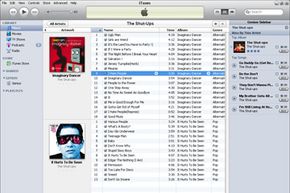
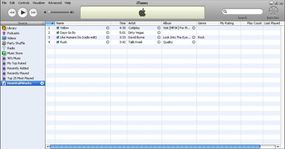
Once you import some music, the iTunes library looks something like this:
![]()
|
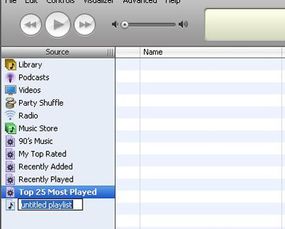
- Create a playlist - Click the "+" button at the bottom-left of the iTunes interface. A new playlist will appear in the Source column.
![]() |
-
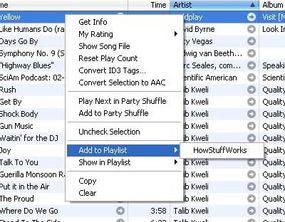
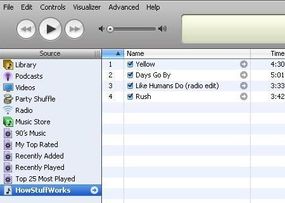
Name your playlist. We'll call ours "HowStuffWorks." Then right-click on each song in your library that you want on this playlist and choose "Add to Playlist" from the list of options. The playlist you just named will appear for you to choose it.
![]() |
-
Here's our new playlist:
![]()
![]() |
- Burn the playlist to a CD - Just put a CD-R in your drive, and the iTunes software detects it. Now the Browse/Burn button in the top-right corner of the iTunes interface is for burning. Click it. Done. You'll have your new CD in about 2 minutes (give or take a minute depending on how many tracks are in your playlist).
- Download your music to an iPod - Plug your iPod into your computer's USB 2.0 port. Done. iTunes sees the player and downloads your entire iTunes library. If you'd rather transfer files manually or only transfer certain playlists, you can change the sync settings at Edit/Preferences/iPod.
|
|
The iTunes Store
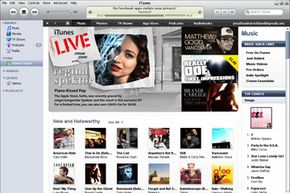
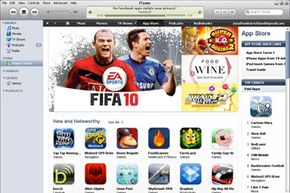
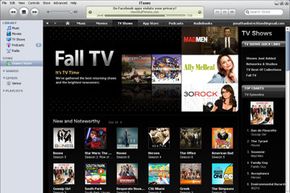
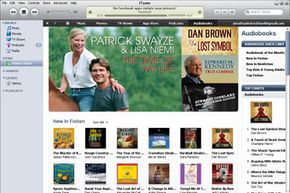
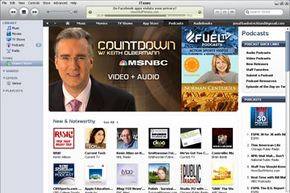
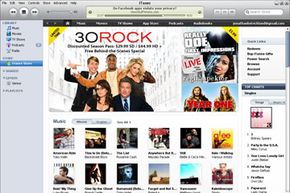
At the iTunes Store, you can find more than 3.5 million songs, 20,000 audiobooks, thousands of music videos, tens of thousands of podcasts, feature films, TV shows, iPod video games and CD album art. All you do to get to the store is click a button in the main iTunes screen. You're not going through a Web browser -- the jukebox software is the user-interface for the store.
![]() iTunes storefront |
Apple has deals with record labels for iTunes-exclusive music tracks from select artists. In addition to pure content, there are community-type functions like user-published reviews, ratings and playlists, and then there is the pop-culture headshaker that is the "celebrity playlist." These are lists of songs (with a little "buy song" button next to each track) reportedly assembled by stars like Jennifer Garner, Jay-Z and Michael Moore (or their PR reps), complete with star commentary for each track. Incidentally, Elton John's "Your Song" makes Courtney Cox and David Arquette cry, and Bob Dylan's "Just Like a Woman" has made Sharon Stone feel "in touch with [her] woman-ness" since she was a young girl.
Here's a breakdown of the store content areas and what you can do there:
- Music
$0.99 per song
Wide price range for albums
Browse by genre (1st level), subgenre (2nd level), artist (3rd level) and album (4th level) - Music videos
$1.99 each
Browse by music genre (1st level) and artist (second level) - Audiobooks
Wide price range
Browse by category (1st level) and author (2nd level) - TV shows
$1.99 each or group rate for season
Browse by title (1st level) and season (second level) - Feature-length films
$9.99 to $14.99 each
Browse by category - Podcasts
Free
Browse by category
Download per episode or subscribe to series
Submit your own podcast to appear in the iTunes podcast library - iPod Games
$4.99 each
Nine games available as of September 2006 - Movie Trailers
Free (streaming format, not download)
Browse by movie studio or movie genre
|
|
|
|
To buy content, you need to set up an iTunes payment account (or an AOL Wallet account -- iTunes accepts those, too). To set up an iTunes account, you provide a credit card number or PayPal account that you'll use for all of your purchases. You can also pay using an iTunes Allowance (sort of like a debit account, typically set up by parents for their kids) or by Music Card or gift certificate.
When you find something you want to buy, you've got two ways to go about it: 1-Click (licensed from Amazon) or shopping cart. If you use 1-Click (which is the default setting for purchases), iTunes immediately charges your account and downloads the file to your iTunes library. If you choose to put stuff in a shopping cart, it's pretty much the same process except you buy a bunch of stuff at once instead of piece by piece. To set yourself up for shopping-cart purchases, you need to change the default setting in your iTunes software (Edit/Preferences/Store).
![]() FYI, iTunes does not accept returns. |
All purchases are accomplished via an SSL (Secure Socket Layer) connection that encrypts the data. Exchanges related to browsing content and sampling songs happens in simple HTTP (hypertext transfer protocol) through a proxy server, which is a lower level server that sits between your computer and the main iTunes Web servers. This cuts down on requests sent to the main system architecture. Here's what else we know about the store's technology infrastructure:
The iTunes Music Store is composed of XML-based pages, lots of them encrypted using 128-bit AES in CBC mode. AES-CBC is a type of symmetric-key encryption. AES ("advanced encryption standard") basically takes a 128-bit block of code and reorganizes it into a 128-bit block of "ciphertext" using a particular key (an encryption algorithm). CBC mode ("cipher block chaining") is a method of disguising any encryption patterns that might reveal the key. In CBC, what happens is sort of like a double-layer encryption scheme. During the encryption process, each consecutive, 128-bit block of unencrypted text (we'll call this the "original block") is XORed with the previous, already encrypted block of ciphertext to generate a 128-bit block of text that represents the original block. The "XOR" operation is a piece of computer code that returns values based on an "exclusive OR" formula -- for example, an XOR operation might state that if the first bit in the original block OR the first bit in the ciphertext block is "1" (but only one or the other), then the resulting value is "1." This "1" is now the first bit in the new, 128-bit "representational block." It is the representational block that will be encrypted using the key. In this way, if you were encrypting a page that had two consecutive, identical 128-bit blocks of code, they would end up as completely different blocks of ciphertext.
The same key is used to encrypt and decrypt the ciphertext -- that's the "symmetric" part of the process. Once each block is decrypted using the key, the XOR operation is reversed to generate the original block of text. See Cryptographic Algorithms and RFC 3602 to learn more about AES-CBC encryption.
As we already mentioned, the iTunes Store uses a proprietary encryption method, called FairPlay, for its digital rights management scheme. When you purchase a song, the file gets encrypted as part of the download process. Next, we'll take a closer look at FairPlay and the controversy surrounding it.
The iTunes Business
|
|
- authorize up to five different computers to play FairPlay-protected files
- burn a protected song to CD as many times as you want
- burn a particular playlist containing a protected song up to seven times
Most of the controversy surrounding FairPlay is about Apple's refusal to license it, not about the limitations it imposes -- as far as DRM schemes go, FairPlay isn't overly restrictive. But since Apple doesn't license FairPlay to anyone, you can only play a protected file using iTunes software, and you can only take it with you on an iPod or an iTunes phone. By keeping FairPlay in-house, Apple has effectively created a dependence loop between iTunes and iPod that some go so far as to call a monopoly on digital entertainment. In January 2005, one person filed a class-action lawsuit against Apple to this effect, claiming the company is violating federal anti-trust laws (see PCWorld: iTunes User Sues Apple Over FairPlay). As of February 2006, the lawsuit was still on track.
The other problem with FairPlay is that is creates a Linux shut-out. Since protected songs will only play on iTunes, and iTunes is only compatible with Mac OS X and Windows 2000/XP, people who use the Linux operating system can't buy content at the iTunes Music Store (actually, they can buy it -- they just can't play it). This has led to an ongoing war between Linux hackers and Apple. The most famous example of this battle is the back-and-forth between a team of hackers led by "DVD Jon" Johansen (who cracked the DeCSS encryption on protected DVDs in 2002) and Apple programmers. In January 2004, Johansen published a piece of code that disabled Apple's DRM scheme on the user end, allowing people to play FairPlay-protected files on a Linux machine. In March 2005, Johansen released a piece of software that disabled FairPlay on the Apple end, creating a glitch in the download process that stopped the encryption from being applied to a file. Just days later, Apple released a new version of the iTunes software that disabled this glitch. One day later, Johansen released another piece of code that recreated the glitch. And from there it goes on in much the same vein.
But it's not just Linux users who feel they're getting the shaft. There are some Apple loyalists who, while not overly concerned about the iTunes/FairPlay dependence loop, are offended by the fact that Apple is trying to restrict their use of their own legally purchased files. There's a sense that the company has sold out its customers in order to broker deals with the entertainment industry. And it's not entirely off base -- the technology business is not what it used to be.
Digital Rights Management
The digital-media business has gotten a lot more complicated in the last decade. When P2P networks opened a gaping hole in the entertainment industry's ability to control the distribution of its content, a war broke out between copyright holders and consumers. The current manifestation of that war is DRM and DRM hacking. FairPlay is only one example of DRM -- most companies dealing with licensed digital content have adopted DRM schemes that limit what a consumer can do with legally purchased files. See How Digital Rights Management Works to learn more.
The fact is, working with the entertainment industry to license content is not a simple process. When Apple strikes a deal to sell licensed content, everybody wants a cut. As soon as iTunes started offering TV shows, Apple having struck deals with the TV networks that own those shows, the five entertainment-industry unions decided they needed a cut, too. So out of that $1.99-per-show charge, Apple is paying royalties to a whole lot of people. Subtract from that the cost of building and maintaining the iTunes technology infrastructure, paying credit-card fees and advertising the service, and it looks like Apple's iTunes Music Store is more of a marketing vehicle than a big revenue generator for the $8 billion company. In short: The iTunes Music Store helps sell iPods. Estimates have anywhere from 10 million to 14 million iPods in use globally in 2006, each of which sold for $100 to $400 per unit. That's revenue to an $8 billion company.
The iTunes Future
The unbelievable iTunes traffic spike in 2005 only promises further success for the iTunes/iPod brand. Nielsen NetRatings reports that 20.7 million people visited the iTunes Music Store that year, a 241 percent increase over 2004. And if they're shopping at iTunes, they might just end up with an iPod so they can bring their music on the road with one quick autosync.Besides nice sales figures, the future of iTunes most certainly includes ongoing hacking wars. One can only wonder if Apple will release a version of iTunes for Linux, if only to eliminate the legitimate complaint that Linux people don't get to use the iTunes Store. Sure, people will still remove the DRM protection, but they won't have as many sympathetic ears for their mission.
In the realm of expanded support, the slowly increasing number of Apple-licensed third-party products, like iTunes phones from Motorola and a standalone iTunes player from Roku, points to the possibility of increased collaboration between Apple and other electronics manufacturers. This is good news for people who like to pick and choose the pieces of their "digital media experience."
One predicted release for 2007 is Apple ITV, a wireless device that will play iTunes movies and TV shows directly on a television with no go-between. Apple is also expanding its content in unexpected directions like iTunesU -- a free service for universities to post lectures and other content for their students to download through the iTunes software. Will universities start supplying every freshman with an iPod so they can listen to lectures while they walk across campus? The next logical step might be to offer a similar service to businesses -- they could use iTunes to supply recorded meetings or training lectures to remote workers and frequent travellers. The future may see iTunes as standard software on office computers (and tiny iPod speakers embedded in the lapels of dark-blue suits everywhere).
For more information on iTunes, check out the links on the next page.
Lots More Information
Related HowStuffWorks Articles
- Podcast Revolution: Tell us your favorites!
- How CD Burners Work
- How Digital Rights Management Works
- How File Sharing Works
- How Home Networking Works
- How iPods Work
- How MP3 Files Work
- How MP3 Players Work
- How Podcasting Works
- How Portable Media Centers Work
More Great Links
- Apple: iTunes 7
- Apple: iTunes Hot Tips - includes how to create Music Store wish lists, convert WMA files and add CD track info
- FindLaw: Antitrust Suit Against Apple Over iPod, iTunes to Proceed - Sep. 22, 2005
- International Herald Tribune: Japanese artists flock to iTunes - Aug. 11, 2005
- ITtoolbox Blogs: How to copy music from your iPod to your iTunes library
- Macintosh Music Software: Portable Players
- PC World: iTunes User Sues Apple Over FairPlay - Jan. 7, 2005
Sources
http://abcnews.go.com/Technology/wireStory?id=1523423
http://www.apple.com/airportexpress/
http://news.bbc.co.uk/2/hi/technology/4639880.stm
http://www.id3.org/intro.html
http://news.com.com/DVD+Jon+reopens+iTunes+back+door/2100-1027_3-5630703.html
http://www.macobserver.com/article/2004/07/13.11.shtml
http://www.apple.com/support/ipod101/
http://docs.info.apple.com/article.html?artnum=93548
http://www.apple.com/itunes/overview/
http://www.macobserver.com/article/2005/10/14.14.shtml
http://www.vnunet.com/computeractive/news/2012404/fairplay-crackers-core-itunes
http://www.apple.com/education/solutions/itunes_u/
http://know.knowledgenetworks.com/2004/fall/article1.html
http://www.pdastreet.com/articles/2006/1/2006-1-31-Moto-SLVR-V7.html
http://docs.info.apple.com/article.html?artnum=93377
http://www.theregister.co.uk/2004/01/05/itunes_drm_cracked_wide_open/
http://www.faqs.org/rfcs/rfc3602.html
http://hcsoftware.sourceforge.net/jason-rohrer/itms4all/
http://www.extremetech.com/article2/0,1558,1784304,00.asp
http://www.theregister.co.uk/2006/01/12/itunes_602_spyware_claim/print.html
http://www.aaronsw.com/2002/itms/