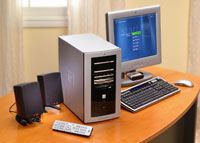
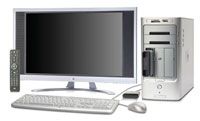
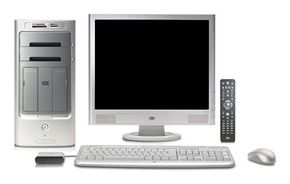
Media-center PCs are made for the home theater in terms of audio and video support, and maintain all the functions of a PC. See more computer pictures.
Photo courtesy HP
Until recently, the typical digital home was divided into two segments: computing and entertainment. In the computing area, we'd browse the Web, send e-mail, maybe do some work, write papers for school, download MP3s and movies, create CDs, and edit video and photos. In the entertainment area, we'd watch and record TV and movies and listen to our CDs and MP3s. Do you notice some overlap? Electronics companies have been trying to build on that overlap for years in products like WebTV, AccessDTV, digital-media servers and computers like the Sony Vaio, an early attempt at a "media-center PC."
The newest attempts at capitalizing on digital overlap skip the small stuff and go all the way to complete integration. Media-center PCs are made for the home theater in terms of audio and video support, and they maintain all of the functions we've come to expect from a home computer. In this article, we'll find out what makes a PC a "media center," how it fits into a home theater and what you can do with it.
At its most basic, a media-center PC is a home computer an A/V receiver combined. It has entertainment-related upgrades that make it a suitable centerpiece for a home theater. Most media-center PCs have progressive-scan DVD playback, over-the-air HDTV support, surround-sound inputs and quieter operation (some use fanless cooling systems). In a single CPU unit, you have a range of functions that encompasses pretty much every aspect of digital media, including:
Computing Functions
Internet
E-mail
Word processing
Video
Stream video from the Internet to your large-screen TV
AM/FM radio (which you can record, up to 30 minutes, like you do TV shows)
Download MP3s to your system and play them on your home-theater speakers
Play, create, rip and burn CDs
Media storage (a typical unit might have 500 GB to 1 TB of storage space for music, movies, photos)
Advertisement
With a media-center PC connected to your TV and your speakers, you can access all of these functions by navigating through onscreen menus. The system is built to be controlled across the room with a remote control, but you can also use a keyboard or mouse just like with a standard PC.
There are a couple of routes to a media-center PC. You can do your own home-theater-related upgrades to a standard PC, or you can buy a prebuilt home-theater PC. If you have a fairly new PC (bought in the last five years, say), and you're up for getting at the motherboard, you can totally turn it into a media center. You may not achieve quite the same results as you would with a PC originally built for a home theater, but you're also going to be spending less cash. Let's take a look at how you can build your own media center using your current computer.
It's a Media-center World
Microsoft isn't the only one interested in home-theater computers. To check out some interesting innovations, see XboxMediaCenter Project and Macintosh Media Center Project. And if you're just looking for a home-theater receiver with built-in media storage, there are lots of media servers out there with some cool features (like 2 terabytes of storage). Check out the Denzel Home Theater Media Server and the ViewVox 1000 for a couple of examples.
Advertisement
Creating Your Own Media-center PC
Doing your own media-center upgrades typically costs less than buying a manufacturer-built system. You can do a pretty decent upgrade for under $1,000. It's a fine way to go if you're just looking for a unit that gets the job done and has some nice home-theater features.
As far as hardware goes, you're not looking at major additions. If you already have a display and a nice set of speakers in your home-theater system, you're really just looking at upgrading your PC sound card and storage capacity (a video library takes up tons of space -- an external hard drive is fine).
Advertisement
The sound card should support whatever speakers you want to use -- stereo, digital surround or multichannel analog surround. If you're looking for home-theater-quality audio, a surround-sound system combined with a 24-bit card will provide excellent sound. If you'll be outputting to a receiver, look for a card with coaxial or optical digital outputs for the best results.
For storage capacity, you'll probably want to be in the 400-to-500-gigabyte range. If you'll be recording HDTV, you might want more. If you're not an audio/video junkie and you're willing to use higher compression ratios, you may need less storage space.
You're also going to need:
a TV tuner, preferably with DVR capability so you can record programs and skip commercials (you can buy a standalone TV tuner or else upgrade your video card to one that includes a tuner)
a PC AM/FM radio receiver
a remote-control setup, including transmitter, receiver and, if you'll be using an external receiver for your speakers, a control cable to connect your PC to the receiver
Technically, this is all you need (and maybe a little more than you need) to use your PC in your home theater. Your PC already has a built-in CD player and DVD player, so you simply need to connect your PC to your TV and your speaker setup using the available outputs on your computer. But if you want to really tie everything together into an integrated media center, you're going to want a piece of media-center software. The advantage to including a piece of software in your upgrade is the added benefit of the onscreen menu and integrated remote control functions that let you control everything through a single interface.
There's a lot of media-center software out there with a variety of features. Overall, a piece of software like Meedio Pro, Sage TV, InterVideo Home Theater or Beyond TV with Beyond Media lets you connect home theater accessories to your computer and control it all through a single interface. You can stream music to other computers, transfer data to a portable device, and view your digital photos on your large-screen TV. Also, a lot of these software packages can put your regular computer monitor into a "theater view" mode that makes it visible from across the room.
When you're talking about media-center software, the most complete package you're going to come across is the Windows XP Media Center Edition (xpMCE) operating system. As recently as 2005, this operating system was only available to PC manufacturers, but now you can buy it and use it as the center of a media-center upgrade. The thing about xpMCE is that it presupposes certain hardware support, so it makes a DIY upgrade slightly more complicated. Still, it is doable. And there are some complete upgrade kits out there that include all of the hardware, software and instructions you need to build your own Windows Media Center PC from the ground up, including the D.Vine D2 Quiet Media Center. This kit comes complete with a chassis, fanless cooling system, motherboard, processor and xpMCE operating system, and it costs about as much as you would spend for one of the less-expensive pre-built systems.
Which brings us to the thing about serious upgrades: Once you get into the bells and whistles that make a media-center computer the highlight of a home theater, DIY stops being all that cost efficient. If you're looking for seamless integration, near-silent operation and a unit that's actually going to upgrade your home theater as opposed to just work with it, you're probably looking at a media-center PC built by the manufacturer.
Computer manufacturers build a media-center PC from the ground up to be part of your home-theater system. You can sit on the couch in your den and send an e-mail to your friend, write up a proposal for work and set up a playlist of MP3s to blast through your surround-sound system -- all using one display, one remote and one CPU. The benefit is the simplicity. The only thing you might need to buy in addition to the PC is a TV tuner and remote, although many systems come with those in the box. Setting it up is a matter of connecting your TV and your speakers. That's it. Some units come with enough connections that you can add on an external DVD or CD player if you want to, but these PCs are really intended to serve as your all-in-one media storage and playback device -- your stereo, your DVD player, your home computer, your photo viewer, your 500-GB hard drive, your PC gaming system and your A/V receiver.
The most common systems run on Windows XP Media Center Edition (xpMCE), although lots of products run a different operating system and incorporate home-theater software (like Sage TV or Meedio Pro). Home-theater PCs are available from just about every computer manufacturer out there, and most look like regular PCs, with the CPU tower, monitor and keyboard.
Advertisement
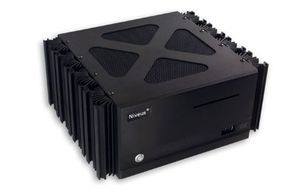
Some manufacturers have adopted a more living-room-friendly form factor, like a CPU shaped more like an A/V receiver than a tower:
Niveus Denali Edition Media Center PC
Photo courtesy Niveus Media
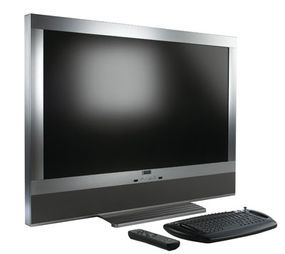
And then there are the real dreamers. The Elonex Lumina actually integrates the CPU into the display, so what you're putting in your living room looks like nothing more than a big flat-panel TV. But there's a whole computer inside, with PC and home-theater inputs and outputs located on the side and back of the device.
Elonex Lumina Media Center PC
Photo courtesy Elonex
On average, you're going to be spending between $3,000 and $7,000 for a top-of-the-line system -- closer to the $7,000 if you plan to buy a fancy new flat-panel display to go with your fancy new media-center setup. One of the "ultimate" Media Center PCs from Gateway priced at about $3,000 has an Intel® Pentium® D 930 with a dual-processor core, a 500-GB hard drive, an NVIDIA® GeForce® 7800 graphics card, 24-bit DVD-Audio playback and full surround-sound support. A TV tuner costs extra. For about $6,000, the Niveus Denali Limited Edition comes with four TV tuners, a 1-terabyte hard disk and fanless cooling. The external, 200-disc CD changer costs extra.
Since the xpMCE-based system is currently the most popular rendition of the home-theater computer, we'll use it as our focus. You'll see xpMCE systems referred to specifically as "Media Center PCs," although other systems may use the same name in generic form. In this article, where "Media Center" is capitalized, we're talking about a computer running Windows XP Media Center Edition.
A Media Center PC can do all of the things a regular Windows XP-based system can do in addition to the home-theater functions. In the next section, we'll find out what this type of system can do for you and what it takes to set it up.
The iMac
Apple's newer iMacs, while not marketed as "media centers," have a lot of the features you'll find on a media-center PC. All 2006 iMacs come with Front Row software that lets you view your photos and DVDs and browse your music collection in a widescreen "theater" view, and you can connect your TV as the computer display. The Apple remote lets you navigate from across the room, too. See Apple: iMac to learn more.
Advertisement
A Closer Look: Windows XP Media Center Edition
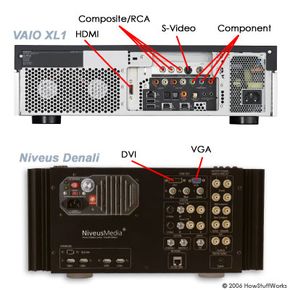
Media Center A/V connections
Photo courtesy Sony Electronics and Niveus Media
The 2005 Windows XP Media Center Edition is arguably the current state of the art in media-center software. The operating system works hand-in-hand with a computer's hardware to create a true home-theater receiver with the media-storage, navigation, organization and integration functions of a PC. A typical Media Center PC offers:
All standard Windows XP programs
DVR with program guide
Local (antenna) digital and HDTV support (no digital playback for DTV or HDTV coming from cable or satellite -- it's a DRM issue)
Progressive-scan DVD playback
MP3 access from personal hard drive or online
Photo viewing and editing
Playing and burning CDs and DVDs (data, audio and video)
Movie search functions (look for a particular movie offered by your TV service provider and in numerous online databases)
Internet connection (preferably broadband to make the most of your system)
A variety of A/V cables
If you can set up an A/V receiver, you can set up a Media Center PC. For a basic setup, you're looking at five primary steps:
Connecting your display It doesn't matter what kind of display you have. Everything from a computer monitor to a flat-panel LCD to a CRT to a projection set will do. You just need the right cable to make the connection. Media Center PCs typically come with all of the basic inputs and outputs you'd find on an A/V receiver, including Composite, S-video and Component Video. It'll also have more PC-centric connections like VGA, DVI or HDMI. You just decide which video quality you want (or what your components can support), plug one end of the cable into your TV's input and plug the other end into the PC's output.
Connecting your TV signal If you're going to watch TV on your display, you've got to connect your TV signal to the Media Center PC. For an antenna or regular cable signal, this means connecting the cable jack or antenna output directly to the PC input. If you're using a digital-cable or satellite set-top box as your video source, there are two connections to make: One from the wall output to the set-top-box input, and one from the set-top-box output to the PC input. The PC has coaxial inputs to accommodate the connection. For digital cable and satellite, you'll just need to create an additional infrared connection so you can control the set-top box with the Media Center remote. See Media Center and your set-top box for complete details. Keep in mind that a Media Center PC can only support over-the-air digital or high-definition signals -- free signals that you receive via antenna. (Only set-top-box manufacturers are allowed to install the decoders for subscription-based digital and HDTV signals.) So if you receive digital or HD programming through a set-top box, you can still watch it, but you're going to be watching it in standard TV quality.
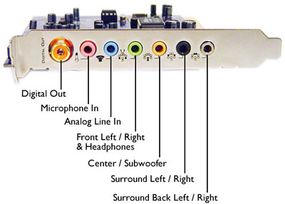
Connecting your speakers If you use a set of PC speakers with your system, the connections are same ones you would make with a standard computer. But you can also connect your current sound system to the Media Center using your current receiver as a pass-through. For a stereo setup, you make a single connection between the PC and the audio receiver (if you have speakers, you have an audio receiver). Using a stereo-mini-to-stereo-RCA cable, you connect the stereo-mini end to the PC's audio-out, and connect the stereo-RCA ends to the CD inputs on the audio receiver. Set the receiver to "CD," and you're ready to go. For a surround-sound setup, the process is only slightly more complicated. Media Center PCs come with different types of sound cards, so you need to make sure you pick a sound card that supports the type of audio setup you plan to use. Pretty much any sound card in a Media Center PC is going to support at least 5.1-channel and probably up to 7.1-channel surround in a variety of formats (DTS, Dolby Digital, etc. -- check out How Surround Sound Works). You can make connections for either digital or multichannel-analog surround. Here's a look at the outputs on a sound-card that supports both:
Photo courtesy Microsoft
You simply make the appropriate connections between the outputs on your PC and the inputs on your receiver. For a single digital connection, you'll be using either a coaxial or a Toslink optical cable. For multichannel analog, you'll be using stereo-mini-to-stereo-RCA cables. Remember to set your receiver to whichever input(s) you use.
Connecting to the Internet To browse the Web, send e-mail and download your TV program guide, you need a connection to the Internet. And to access online features like streaming media, you're going to want a broadband connection. You connect the Media Center PC to the Internet the same way you would any other computer. If you already have a cable or DSL connection in your home, all you need to do is add the Media Center PC to your home network. For a media-center setup, a wireless connection is ideal. See How WiFi Works and How Home Networking Works to learn about various networking methods.
Configuring your system You can configure your entire system from the start menu. Click on "Settings," and you can get to all of the media setup options. The computer walks you through each setting using various setup "wizards" that you're already familiar with if you have a Windows PC. For the basic configuration, you'll just need to tell the Media Center a few things, including: Are you using a set-top box as your video source? Use the TV Signal Setup Wizard to let Media Center PC know what it's connected to -- cable? Digital cable? Satellite? Are you using non-Media Center speakers? Use the Speaker Setup Wizard to configure the Media Center audio decoder for your speaker setup. You'll need to tell it details like whether you're connected to a receiver, whether your setup is stereo, digital surround or multichannel analog, how big your speakers are and whether you're using a subwoofer. Which TV service do you use? The Media Center PC displays a program guide for your TV. It's a free service that updates daily via your Internet connection -- Microsoft downloads program listings from your TV service provider for up to 14 days out. You tell the Setup Wizard your zip code, and it shows you all of the service providers in your area. You just pick yours from the list.
And there you are -- your basic Media Center PC setup. But there are a few extra options and advanced features that you can add to your system once you know what you're doing. In the next section, we'll take a look at a few of the things you can add to your new home-theater setup.
Advertisement
Windows XP Media Center Edition: Extras and Advanced Functions
Once you've made your connections and configured the Media Center software, you're sitting in your den with a PC-based home theater. You've got your TV programming, your sound system, the Internet and your entire digital library of movies, music and photos at your fingertips. What you can do in terms of accessing, inputting to, outputting from and combining those elements is virtually unlimited. Here are just a few of your options:
Downloadable plug-ins
mce Weather provides real-time local weather reports.
My Movies lets you download movie data and organize your movie collection based on title, director, keyword, genre, etc.
Media Center Karaoke turns your home theater into a karaoke setup.
MCE Caller ID Client receives caller-ID information from a PC connected to your phone line and tells you onscreen who's calling.
Add multiple monitors/displays
You can set up Media Center to have two displays -- your TV and a computer monitor, for example. The displays can show two different views simultaneously. You can watch a movie on the TV while you surf the Internet on the computer monitor. In most cases, the video card is already equipped to handle this function. You just need to configure it for two outputs using the xpMCE setup guide.
Advertisement
Multiple TV tuners
If you have two TV tuners, you can watch one pre-recorded show off the hard drive while recording two live ones. If you have three tuners, you can watch one pre-recorded show while recording three live ones. If you have, say, three tuners and two displays, you can watch two live shows at the same time while recording a third.
Media Center Extender
You can use one or more Media Center Extender to output the signals from your Media Center PC to other displays (and/or an Xbox 360) in your house. It's basically a networking system built specifically for the Media Center PC. For complete setup and configuration instructions, see Microsoft Windows XP Media Center Edition 2005.
The Windows xpMCE system offers the functionality of a PC and a home-theater receiver in a single box. If you're looking to integrate your digital activities, a media-center PC is a great way to go. But the technology is still in its adolescence. In the end, software-based integration may be just a starting point. It may be hardware developments that really direct the future of the home theater. Intel has developed a new processor platform called Viiv, which specifically addresses the needs of home-theater PCs. Intel's goal with the Viiv setup is to standardize the hardware aspects of the media-center market so that consumers and developers can depend on and build on a certain known set of parameters. PCs with "Viiv inside" should start shipping by the middle of 2006.
For more information on media-center PCs and related topics, check out the links on the next page.
Advertisement
Frequently Answered Questions
What does a media center have?
A media center has a computer, a TV, and a sound system.
How does a media center work?
A media center is a computer that stores and organizes your digital media, including music, photos, and videos. You can use a media center to play your media on your TV, stereo, or other devices.
What is the best computer for media?
The best computer for media would be one with a powerful processor, plenty of RAM, and a large hard drive.