
Looping
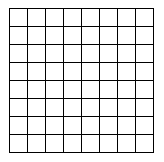
One of the things that computers do very well is perform repetitive calculations or operations. In the previous sections, we have seen how to write "sequential blocks of code," so the next thing we should discuss is the techniques for causing a sequential block of code to occur repeatedly.
For example, let's say that I ask you to draw the grid pictured at the top of the page.
Advertisement
A good place to start would be to draw the horizontal lines.
One way to draw the lines would be to create a sequential block of code:
import java.awt.Graphics;

public class FirstApplet extends java.applet.Applet
{

    public void paint(Graphics g)
    {
        int y;
        y = 10;
        g.drawLine(10, y, 210, y);
        y = y + 25;
        g.drawLine(10, y, 210, y);
        y = y + 25;
        g.drawLine(10, y, 210, y);
        y = y + 25;
        g.drawLine(10, y, 210, y);
        y = y + 25;
        g.drawLine(10, y, 210, y);
        y = y + 25;
        g.drawLine(10, y, 210, y);
        y = y + 25;
        g.drawLine(10, y, 210, y);
        y = y + 25;
        g.drawLine(10, y, 210, y);
        y = y + 25;
        g.drawLine(10, y, 210, y);
    }
}
(For some new programmers, the statement "y = y + 25;" looks odd the first time they see it. What it means is, "Take the value currently in the variable y, add 25 to it and place the result back into the variable y." So if y contains 10 before the line is executed, it will contain 35 immediately after the line is executed.)
Most people who look at this code immediately notice that it contains the same two lines repeated over and over. In this particular case the repetition is not so bad, but you can imagine that if you wanted to create a grid with thousands of rows and columns, this approach would make program-writing very tiring. The solution to this problem is a loop, as shown below:
import java.awt.Graphics;

public class FirstApplet extends java.applet.Applet
{

    public void paint(Graphics g)
    {
        int y;
        y = 10;
        while (y <= 210)
        {
            g.drawLine(10, y, 210, y);
            y = y + 25;
        }
    }
}
When you run this program, you will see that it draws nine horizontal lines 200 pixels long.
The while statement is a looping statement in Java. The statement tells Java to behave in the following way: At the while statement, Java looks at the expression in the parentheses and asks, "Is y less than or equal to 210?"
- If the answer is yes, then Java enters the block of code bracketed by braces -- "{" and "}". The looping part occurs at the end of the block of code. When Java reaches the ending brace, it loops back up to the while statement and asks the question again. This looping sequence may occur many times.
- If the answer is no, it skips over the code bracketed by braces and continues.
So you can see that when you run this program, initially y is 10. Ten is less than 210, so Java enters the block in braces, draws a line from (10,10) to (210, 10), sets y to 35 and then goes back up to the while statement. Thirty-five is less than 210, so Java enters the block in braces, draws a line from (10,35) to (210, 35), sets y to 60 and then goes back up to the while statement. This sequence repeats until y eventually gets to be greater than 210. Then the program quits.
We can complete our grid by adding a second loop to the program, like this:
import java.awt.Graphics;

public class FirstApplet extends java.applet.Applet
{

    public void paint(Graphics g)
    {
        int x, y;
        y = 10;
        while (y <= 210)
        {
            g.drawLine(10, y, 210, y);
            y = y + 25;
        }
        x = 10;
        while (x <= 210)
        {
            g.drawLine(x, 10, x, 210);
            x = x + 25;
        }
    }
}
You can see that a while statement has three parts:
- There is an initialization step that sets y to 10.
- Then there is an evaluation step inside the parentheses of the while statement.
- Then, somewhere in the while statement there is an increment step that increases the value of y.
Java supports another way of doing the same thing that is a little more compact than a while statement. It is called a for statement. If you have a while statement that looks like this:
        y = 10;
        while (y <= 210)
        {
            g.drawLine(10, y, 210, y);
            y = y + 25;
        }
then the equivalent for statement looks like this:
        for (y = 10; y <= 210; y = y + 25)
        {
            g.drawLine(10, y, 210, y);
        }
You can see that all the for statement does is condense the initialization, evaluation and incrementing lines into a short, single line. It simply shortens the programs you write, nothing more.
While we are here, two quick points about loops:
- In many cases, it would be just as easy to initialize y to 210 and then decrement it by 25 each time through the loop. The evaluation would ask, "Is y greater than or equal to 10?" The choice is yours. Most people find it easier to add than subtract in their heads, but you might be different.
- The increment step is very important. Let's say you were to accidentally leave out the part that says "y = y + 25;" inside the loop. What would happen is that the value of y would never change -- it would always be 10. So it would never become greater than 210 and the loop would continue forever (or until you stop it by turning off the computer or closing the window). This condition is called an infinite loop. It is a bug that is pretty common.
To get some practice with looping, try writing programs to draw the following figures:

For lots more information on Java and other computer programming languages, check out the links below.