
Viewing Videos from Hulu
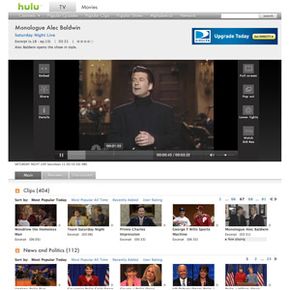
Adobe provides the video player platform at Hulu.com. As we mentioned in the previous section, the player is an interactive Flash presentation. Hulu's distribution partners stream the same video content from Hulu, including the Hulu logo watermark in the lower right corner of the screen. However, partner sites use their own Flash players to display the content.
While a video is playing, move your mouse over the Flash presentation to use all the interactive options. Not only can you play, pause, and adjust the volume, but you can also monitor the video's playing time and click any spot on the timeline to jump to different parts of the video. To turn on closed captioning, click the "cc" between the playtime and volume controls.
Advertisement
Advertisements are loaded dynamically as soon as the video is loaded. Sponsors often include a banner ad above the Flash presentation in addition to the "limited interruption" message at the beginning of the video. Marks in the video timeline indicate upcoming ads, but occasionally Hulu offers users the choice to watch one longer ad at the start of the video instead of the shorter ads located throughout. You can't skip ads while they're playing, but Hulu lets you give featured ads a thumbs-up or -down. Note that your options for viewing or skipping ads vary at the sites belonging to Hulu's distribution partners.
On either side of the video, Hulu presents several viewing options. On the left side, you can click to view video details or to share the video by e-mail, blog post or Hulu friend recommendation. Also on the left side is the option to embed the video on another Web site, including a timeline that lets you adjust how much of the video you want to embed.
On the right side of the video, Hulu offers three different viewing options. The full screen option fills your computer screen, though Hulu returns to its normal browser mode when you press your escape key or try to use any other applications on the computer. The "pop out" option launches the Flash application in a separate resizable browser window that allows you to use your browser for other things as you watch. The "lower lights" feature darkens and disables the rest of the Web page to highlight the video and the sponsor's banner. You can toggle to "raise lights" to turn this off.
The next page covers the technology behind the Hulu Web site and video streams.