Inside This Article
1.
2.
3.
PCI Express Connection Speeds
The 32-bit PCI bus has a maximum speed of 33 MHz, which allows a maximum of 133 MB of data to pass through the bus per second. The 64-bit PCI-X bus has twice the bus width of PCI. Different PCI-X specifications allow different rates of data transfer, anywhere from 512 MB to 1 GB of data per second.

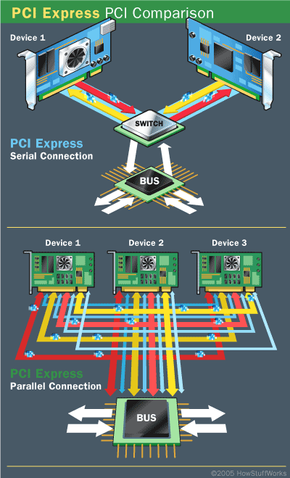
Devices using PCI share a common bus, but each device using PCI Express has its own dedicated connection to the switch.
|
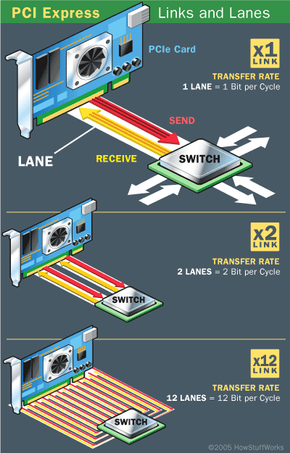
A single PCI Express lane, however, can handle 200 MB of traffic in each direction per second. A x16 PCIe connector can move an amazing 6.4 GB of data per second in each direction. At these speeds, a x1 connection can easily handle a gigabit Ethernet connection as well as audio and storage applications. A x16 connection can easily handle powerful graphics adapters.
How is this possible? A few simple advances have contributed to this massive jump in serial connection speed:
- Prioritization of data, which allows the system to move the most important data first and helps prevent bottlenecks
- Time-dependent (real-time) data transfers
- Improvements in the physical materials used to make the connections
- Better handshaking and error detection
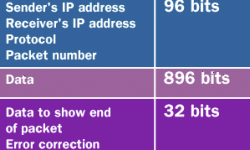
- Better methods for breaking data into packets and putting the packets together again. Also, since each device has its own dedicated, point-to-point connection to the switch, signals from multiple sources no longer have to work their way through the same bus.
|
Slowing the Bus
Interference and signal degradation are common in parallel connections. Poor materials and crossover signal from nearby wires translate into noise, which slows the connection down. The additional bandwidth of the PCI-X bus means it can carry more data that can generate even more noise. The PCI protocol also does not prioritize data, so more important data can get caught in the bottleneck. Using the Accelerated Graphics Port (AGP) slot for video cards removes a substantial amount of traffic, but not enough to compensate for faster processors and I/O devices.
|
Inside This Article
1.
2.
3.
PCI Express Connection Speeds