Introduction to How WiMAX Works
![]() Photo courtesy Intel |
- Broadband access - In your home, you have either a DSL or cable modem. At the office, your company may be using a T1 or a T3 line.
- WiFi access - In your home, you may have set up a WiFi router that lets you surf the Web while you lounge with your laptop. On the road, you can find WiFi hot spots in restaurants, hotels, coffee shops and libraries.
- Dial-up access - If you are still using dial-up, chances are that either broadband access is not available, or you think that broadband access is too expensive.
The main problems with broadband access are that it is pretty expensive and it doesn't reach all areas. The main problem with WiFi access is that hot spots are very small, so coverage is sparse.
What if there were a new technology that solved all of these problems? This new technology would provide:
- The high speed of broadband service
- Wireless rather than wired access, so it would be a lot less expensive than cable or DSL and much easier to extend to suburban and rural areas
- Broad coverage like the cell phone network instead of small WiFi hotspots
WiMAX has the potential to do to broadband Internet access what cell phones have done to phone access. In the same way that many people have given up their "land lines" in favor of cell phones, WiMAX could replace cable and DSL services, providing universal Internet access just about anywhere you go. WiMAX will also be as painless as WiFi -- turning your computer on will automatically connect you to the closest available WiMAX antenna.
In this article, we'll find out how WiMAX works, what engineers are doing to make it better and what it could mean for the future of wireless Internet.
How WiMAX Works
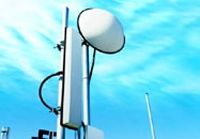
![]() Photo courtesy Intel WiMAX transmitting tower |
A WiMAX system consists of two parts:
- A WiMAX tower, similar in concept to a cell-phone tower - A single WiMAX tower can provide coverage to a very large area -- as big as 3,000 square miles (~8,000 square km).
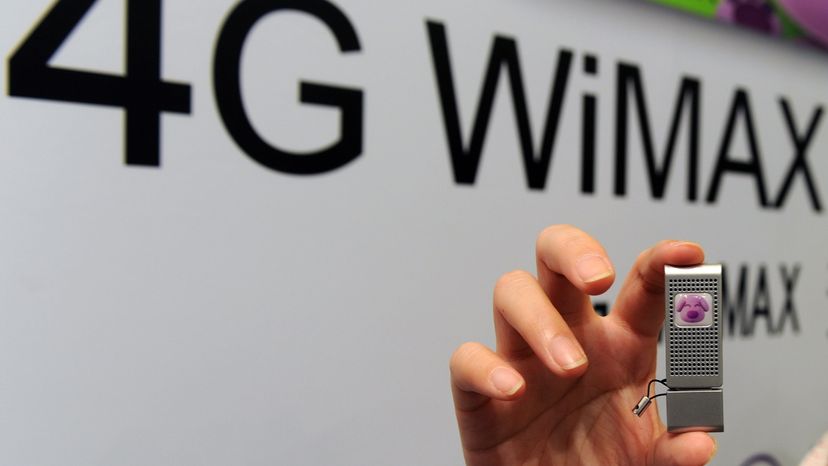
- A WiMAX receiver - The receiver and antenna could be a small box or PCMCIA card, or they could be built into a laptop the way WiFi access is today.
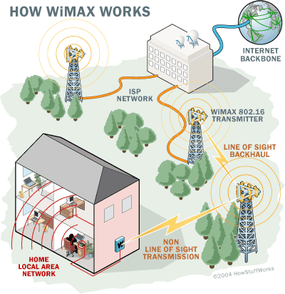
![]() |
What this points out is that WiMAX actually can provide two forms of wireless service:
- There is the non-line-of-sight, WiFi sort of service, where a small antenna on your computer connects to the tower. In this mode, WiMAX uses a lower frequency range -- 2 GHz to 11 GHz (similar to WiFi). Lower-wavelength transmissions are not as easily disrupted by physical obstructions -- they are better able to diffract, or bend, around obstacles.
- There is line-of-sight service, where a fixed dish antenna points straight at the WiMAX tower from a rooftop or pole. The line-of-sight connection is stronger and more stable, so it's able to send a lot of data with fewer errors. Line-of-sight transmissions use higher frequencies, with ranges reaching a possible 66 GHz. At higher frequencies, there is less interference and lots more bandwidth.
WiFi-style access will be limited to a 4-to-6 mile radius (perhaps 25 square miles or 65 square km of coverage, which is similar in range to a cell-phone zone). Through the stronger line-of-sight antennas, the WiMAX transmitting station would send data to WiMAX-enabled computers or routers set up within the transmitter's 30-mile radius (2,800 square miles or 9,300 square km of coverage). This is what allows WiMAX to achieve its maximum range.
|
|
What Can WiMAX Do?
|
Intel also announced that it would be partnering with a company called Clearwire to push WiMAX even further ahead. Clearwire plans to send data from WiMAX base stations to small wireless modems. See Intel, Clearwire to Accelerate Deployment of WiMAX Networks Worldwide (Oct. 25, 2004). |
The fastest WiFi connection can transmit up to 54 megabits per second under optimal conditions. WiMAX should be able to handle up to 70 megabits per second. Even once that 70 megabits is split up between several dozen businesses or a few hundred home users, it will provide at least the equivalent of cable-modem transfer rates to each user.
The biggest difference isn't speed; it's distance. WiMAX outdistances WiFi by miles. WiFi's range is about 100 feet (30 m). WiMAX will blanket a radius of 30 miles (50 km) with wireless access. The increased range is due to the frequencies used and the power of the transmitter. Of course, at that distance, terrain, weather and large buildings will act to reduce the maximum range in some circumstances, but the potential is there to cover huge tracts of land.
IEEE 802.16 Specifications
- Range - 30-mile (50-km) radius from base station
- Speed - 70 megabits per second
- Line-of-sight not needed between user and base station
- Frequency bands - 2 to 11 GHz and 10 to 66 GHz (licensed and unlicensed bands)
- Defines both the MAC and PHY layers and allows multiple PHY-layer specifications (See How OSI Works)
|
WiMAX could be used to set up a back-up (or even primary) communications system that would be difficult to destroy with a single, pinpoint attack. A cluster of WiMAX transmitters would be set up in range of a key command center but as far from each other as possible. Each transmitter would be in a bunker hardened against bombs and other attacks. No single attack could destroy all of the transmitters, so the officials in the command center would remain in communication at all times. |
Dollars and Cents
![]() Logo courtesy Intel |
It depends how it will be used. There are two ways WiMAX can be implemented -- as a zone for wireless connections that single users go to when they want to connect to the Internet on a laptop (the non-line-of-sight "super WiFi" implementation), or as a line-of-sight hub used to connect hundreds of customers to a steady, always-on, high-speed wireless Internet connection.
Under the "super WiFi" plan, cities might pay to have WiMAX base stations set up in key areas for business and commerce and then allow people to use them for free. They already do this with WiFi, but instead of putting in a bunch of WiFi hot spots that cover a few hundred square yards, a city could pay for one WiMAX base station and cover an entire financial district. This could provide a strong draw when city leaders try to attract businesses to their area.
Some companies might set up WiMAX transmitters and then make people pay for access. Again, this is similar to strategies used for WiFi, but a much wider area would be covered. Instead of hopping from one hot spot to another, WiMAX-enabled users could have Internet access anywhere within 30 miles of the WiMAX base station. These companies might offer unlimited access for a monthly fee or a "pay as you go" plan that charges on a per-minute or per-hour basis.
The high-speed wireless hub plan has the potential to be far more revolutionary. If you have high-speed Internet access now, it probably works something like this: The cable (or phone) company has a line that runs into your home. That line goes to a cable modem, and another line runs from the modem to your computer. If you have a home network, first it goes to a router and then on to the other computers on the network. You pay the cable company a monthly fee, which reflects in part the expense of running cable lines to every single home in the neighborhood.
On the next page, we'll discuss how WiMAX can work for you.
The WiMAX Scenario
Here's what would happen if you got WiMAX. An Internet service provider sets up a WiMAX base station 10 miles from your home. You would buy a WiMAX-enabled computer (some of them should be on store shelves in 2005) or upgrade your old computer to add WiMAX capability. You would receive a special encryption code that would give you access to the base station. The base station would beam data from the Internet to your computer (at speeds potentially higher than today's cable modems), for which you would pay the provider a monthly fee. The cost for this service could be much lower than current high-speed Internet-subscription fees because the provider never had to run cables.
|
The next step up is a local area network (LAN). A LAN allows devices to share information, but is limited to a fairly small central area, such as a company's headquarters, a coffee shop or your house. Many LANs use WiFi to connect the network wirelessly. WiMAX is the wireless solution for the next step up in scale, the metropolitan area network (MAN). A MAN allows areas the size of cities to be connected.
|
If you have a home network, things wouldn't change much. The WiMAX base station would send data to a WiMAX-enabled router, which would then send the data to the different computers on your network. You could even combine WiFi with WiMAX by having the router send the data to the computers via WiFi.
WiMAX doesn't just pose a threat to providers of DSL and cable-modem service. The WiMAX protocol is designed to accommodate several different methods of data transmission, one of which is Voice Over Internet Protocol (VoIP). VoIP allows people to make local, long-distance and even international calls through a broadband Internet connection, bypassing phone companies entirely. If WiMAX-compatible computers become very common, the use of VoIP could increase dramatically. Almost anyone with a laptop could make VoIP calls.
For more information on WiMAX, wireless networking and related topics, check out the links on the next page.
Lots More Information
Related HowStuffWorks Articles
- How WiFi Works
- How Home Networking Works
- How VoIP Works
- How WAP Works
- How Broadband Over Powerlines Works
- How Cable Modems Work
- How DSL Works
- How Radio Works
- Quiz Corner: WiFi Quiz
More Great Links
- eWeek: Wi-Fi Hot-Spot Finders
- Intel: The Technology Vision for WiMAX
- Ars Technica: WiMAX panned as mere hype?
Sources
- IEEE 802.16 Backgrounder, May 24, 2002
http://ieee802.org/16/pub/backgrounder.html
- NetworkDictionary.com: IEEE 802.16: Broadband Wireless MAN Standard (WiMAX)
http://www.networkdictionary.com/protocols/80216.php
- TechTarget: Replacing your T1 with nothing but air
http://searchmobilecomputing.techtarget.com/qna/0,289202,sid40_
gci896772,00.html